
Freeze Frame Explained: Meaning, Techniques & Iconic Examples in Film and Photography
There are movies with still scenes that stay in our memories forever. These scenes, which seem frozen in time, serve multiple purposes, and each time we see one, it gives us a moment to pause and reflect.
Today, we’ll explore the freeze frame technique, its definition and purpose, and memorable films that use it to craft iconic moments. You’ll also discover a step-by-step guide for creating a dramatic pause through freeze frame in Vegas Pro.
Let’s dive in!
What is a Freeze Frame
A freeze frame is a filmmaking and video editing technique where motion abruptly stops, turning a moving image into a single, static photograph. It acts like hitting "pause" on a video and is primarily used to emphasize a dramatic moment, create a comedic effect, or provide a striking, iconic ending.
Depending on its purpose, a freeze frame is usually held for 2 to 5 seconds, enough to interrupt movement and force the audience to pause and focus on it. It can also be used at the beginning, middle, or end of the movie, with different purposes and impact, depending on where you use it. And of course, if you are creative, a freeze frame can be used in many other ways.
Freeze frames draw attention, accentuate key moments, and can introduce added information through text or narration. Misused, they may disrupt pacing or diminish immersion.
The first known freeze frame is credited to Alfred Hitchcock in his 1928 silent film Champagne, where it serves as a transition, freezing the dance scene into a photograph in the next scene. In the years that followed, the freeze frame technique has been used in many creative ways, producing some of cinema's most iconic moments.
The Purpose of Freeze Frames
When using the freeze frame technique, choose the scene wisely, as it must make sense in the story. There are different purposes for using freeze frames: to emphasize moments, introduce characters, highlight moods and emotions, and to show resolutions without being explicit.
Ending Scenes
Freeze frames are frequently used in ending scenes. They deliver a dramatic conclusion, encapsulating the film’s theme in a definitive shot that imprints the story, message, and mood in memory. A notable example is The Breakfast Club’s final pose. A freeze frame can foreshadow events without revealing them or offer ambiguous endings. It also conveys character outcomes in films based on real stories.
Character Introductions and Stylized Intro Sequences
Freeze frames in intro sequences can spotlight characters. These scenes may be stylized or include descriptive text, isolating the subject and crafting bold title sequences. For example, Suicide Squad introduces each character with on-screen text.
Comedic and Breaking the Fourth Wall
Freeze frames amplify jokes or shift the narrative tone. A narrator may pause to clarify a comedic moment or break the fourth wall with a personal and humorous exchange with viewers, as seen in Malcolm in the Middle and Arrested Development, to name a few.
Provide Extra Details
Freeze frame can also add extra details, drawing attention to a specific element by zooming in on on-screen elements and freezing them for a few seconds. This is with comedic intention, as in the film Scott Pilgrim vs. the World, which uses freeze frames to zoom in on and label items, weapons, or enemy stats with arcade-style text overlays.
Freeze Frames in Movies:
Now, let’s look at real examples of freeze frames in movies. There are many, but I will list just a few that illustrate different uses of the freeze frame technique, so you can see them in action and use them as inspiration for your films and videos.
Butch Cassidy and the Sundance Kid (1969)
This dramatic final scene ends with a freeze frame of the duo as they run toward their imminent end, immortalizing them at their highest peak of bravery. This iconic scene laid the groundwork for how future filmmakers would use the freeze frame technique to play with the audience's emotions.
Karate Kid (1984)
In The Karate Kid ending, the final frame zooms in on a close-up of Mr. Miyagi giving a quiet nod with a proud smile before the credits roll. This shows that the emotional heart of the story wasn't the trophy or the tournament, but the relationship between Daniel and Mr. Miyagi. With the resolution of the emotional arc, the movie comes to an end, with no epilogue, no afterward, leaving the audience feeling the emotion of that closure.
The Breakfast Club (1985)
Another 80s classic is the freeze frame at the end, with John Bender's defiant fist pump. The freeze frame traps him in that perfect moment of validation before he has to go back to his reality. This ending gives closure to their time spent together and the connections they made, but we don’t know what tomorrow will bring for them.
Snatch (2000)
The movie Snatch uses a highly stylized freeze frame for character introductions in the opening sequence. The camera follows the main characters in their daily lives, then pauses and changes the background color and tone, with a stylized graphic text displaying their street nickname, setting the film's tone.
Harry Potter and the Prisoner of Azkaban (2004)
In the third installment of the Harry Potter movies, Alfonso Cuaron transformed the “happy ending freeze-frame” into a stylized, surreal shot. Instead of showing Harry flying beautifully into the clouds and using the freeze frame on a clean shot of his smiling face, Cuaron made the freeze happen mid-motion, leaving Harry's face completely distorted and motion-blurred as he flies directly into the camera at the terrifying speed of his brand new Firebolt.
Sonic the Hedgehog (2020)
Freeze frames can also be used in animated films. One example is in the Sonic the Hedgehog film, which starts in mid-action, then pauses in a freeze frame of Sonic as he begins to narrate how he ended up in that situation, building immediate intrigue by showing the consequence before the cause.
Creating Freeze Frame Effects with Vegas Pro

It’s time to learn how to create a freeze frame effect in Vegas Pro. You can download the 15-day trial of Vegas Pro to follow this tutorial.
Step 1: Set Up the Project
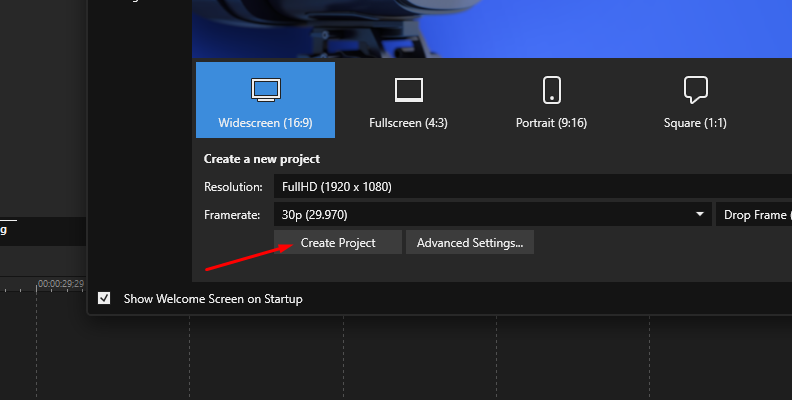
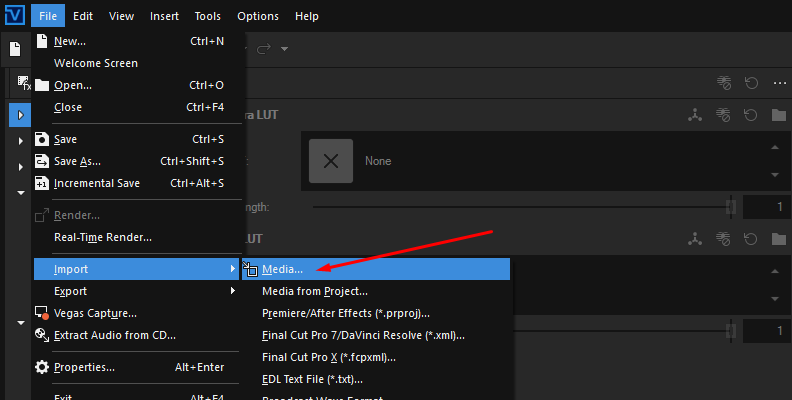
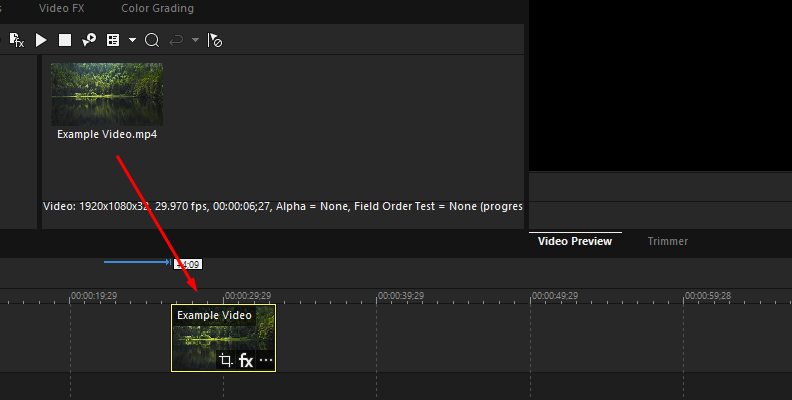
Open or set up a new project, import the video, and arrange the sequence. Zoom in on the video clip to find the frame you want to freeze and place the playhead at that position.
Step 2. Freeze Frame at Cursor
Click the three dots button on the bottom right corner of the event and select “Freeze Frame at Cursor".
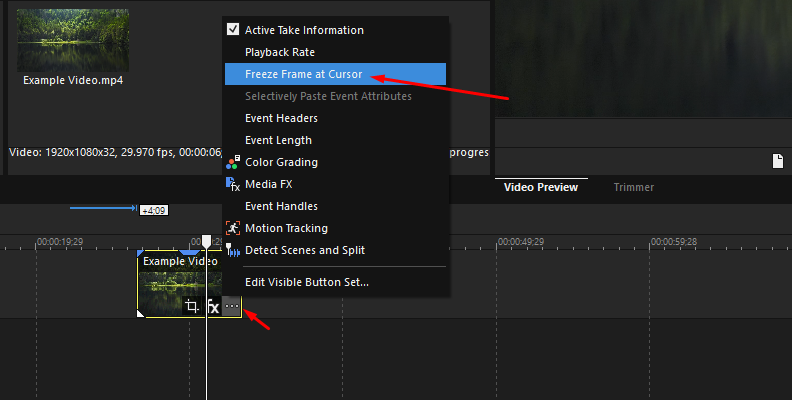
This will automatically add a velocity envelope and add a keyframe at that point at velocity 0%. If you play the event, it will freeze at the specified frame and remain frozen for the rest of the clip.
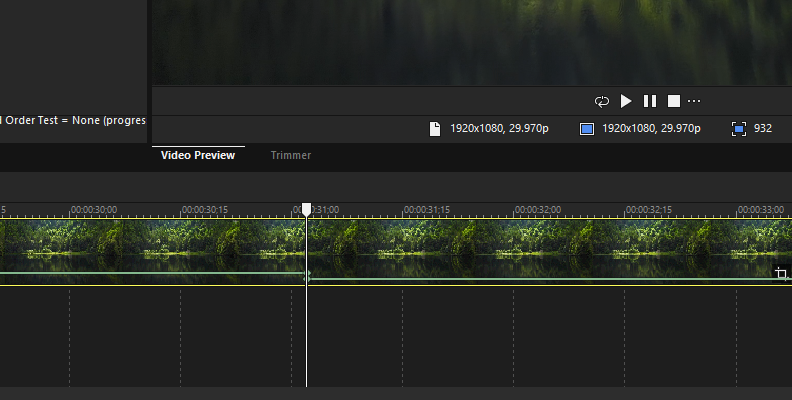
Step 3: Adjust Velocity Envelope
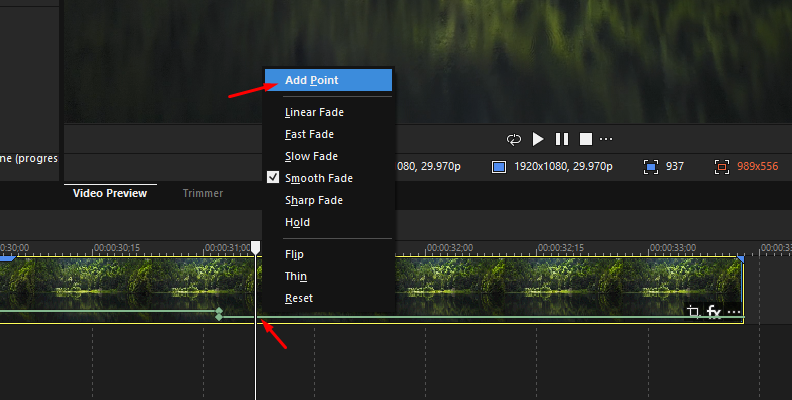
To freeze the frame for a few seconds, then continue playing the clip normally, move the playhead to a position a few seconds later, right-click the velocity envelope, add a point, then add a second point next to the first.
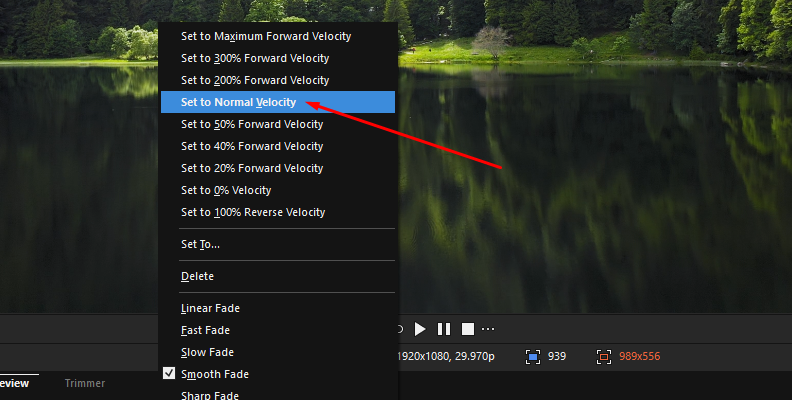
Right-click the second point and set it to “Normal velocity.”
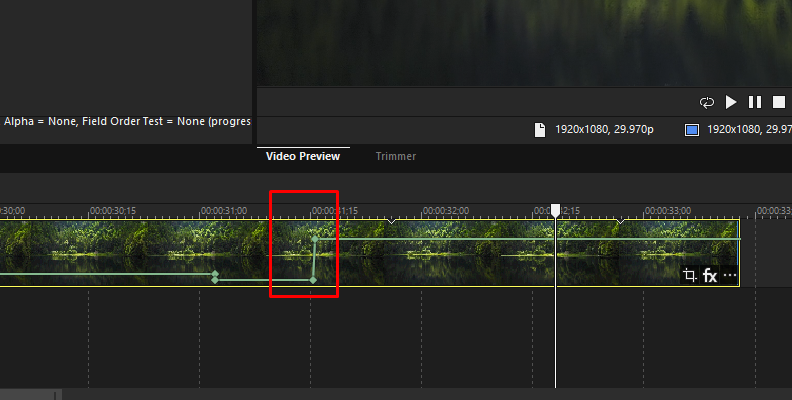
Hold Shift + Click to move the second point to adjust the speed at which the freeze frame resumes playback. Aligning it vertically with the previous keyframe will instantly resume the playback at 100% velocity, like a “pause button” effect.
Final Words
Creating the freeze frame effect in Vegas Pro or other video editing software is easy. The difficult part is knowing how to make a freeze frame interesting and meaningful in the context of your videos.
Good luck, and stay creative!